About Metadata Pro
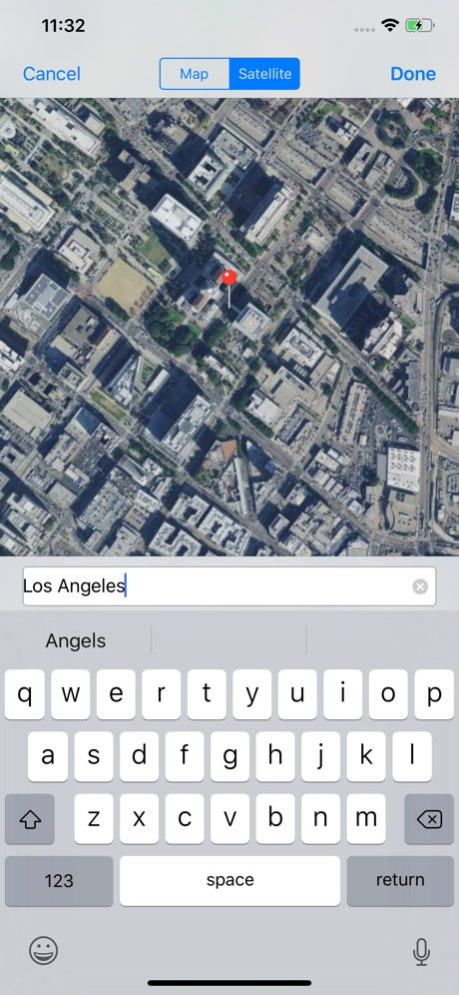
PHOTO AND VIDEO METADATA EDITOR .Single or batch edit date .Single or batch edit location/GPS .Single or batch EXIF, PNG, and TIFF metadata .Single or batch shift dates to correct timezone (i.e. shift photos by 5 hours)...
PHOTO AND VIDEO METADATA EDITOR .Single or batch edit date .Single or batch edit location/GPS .Single or batch EXIF, PNG, and TIFF metadata .Single or batch shift dates to correct timezone (i.e. shift photos by 5 hours) Built in actions to quickly perform these functions to a single or batch of photos/videos: .Remove GPS/Location metadata .Remove All metadata .Set to current date and time Additional Features: .View filename and size of photos and videos .View duration and resolution of videos .Export metadata from photos and videos to apply to other photos and videos .Create metadata schemas to reuse on photo and videos .Read metadata of RAW photo file types such as CR2, NEF, DNG, and more! (Note: export of RAW file types not supported at this time) Metadata Pro supports adding, removing, and/or editing the following photo metadata: GPS: .Altitude .AltitudeRef .Latitude .LatitudeRef .Longitude .LongitudeRef TIFF: .Artist .Copyright .DateTime .ImageDescription .Make .Model .Orientation .Software PNG: .Author .Copyright .Description .Software .Title IPTC: .Keywords Exif: .ApertureValue .BodySerialNumber .BrightnessValue .CameraOwnerName .Contrast .CustomRendered .DateTimeDigitized .DateTimeOriginal .DigitalZoomRatio .ExposureBiasValue .ExposureIndex .ExposureMode .ExposureProgram .ExposureTime .Flash .FlashEnergy .FNumber .FocalLength .FocalLenIn35mmFilm .FocalPlaneResolutionUnit .FocalPlaneXResolution .FocalPlaneYResolution .GainControl .Gamma .ISOSpeed .LensMake .LensModel .LensSerialNumber .LightSource .MeteringMode .RecommendedExposureIndex .Saturation .SceneCaptureType .SceneType .SensingMethod .SensitivityType .Sharpness .ShutterSpeedValue .StandardOutputSensitivity .SubsecTime .SubsecTimeDigitized .SubsecTimeOrginal .UserComment .WhiteBalance Metadata Pro supports adding, removing, and/or editing the following video metadata: .Copyright .CreationDate .Description .Location .Make .Model .Software Note: Modifying of existing photos and videos is only possible with JPG/JPEG photos and MOV videos.
Version History Bug fixes and optimizations. 10.0 07/12/2024 Minor bug fixes and improvements. 9.2 10/19/2020 -Fixed bug where dates could not be selected. -Fixed share extension layout when device changes orientation. 9.1 10/13/2020 -Added spaces in metadata names for easier reading. For example "PixelHeight" will now display as "Pixel Height". -The iPad share extension screen is now much bigger. -Increased font size of the metadata information on iPad. 9.0 10/04/2020 Bug fixes. 8.9 08/06/2020 Bug fixes. 8.8 07/02/2020 Photos are now added to the Metadata Pro album. 8.7 01/12/2020 Fixed issue with processing metadata in iOS 13.2. 8.5 10/31/2019 Fixed a bug where videos where not being created when editing metadata with the overwrite setting off. 8.4 10/13/2019 Bug fixes. 8.3 10/03/2019 Bug fixes. 8.2 09/13/2019 Bug fixes. 8.1 07/09/2019 •Batch editing has been greatly optimized so now you only need to confirm one time when editing a batch of photos. •Added a feature to shift photo creation dates by any any time frame you desire. Select the "Creation Date Shift" field to shift your creation dates. Now, for example, you can shift the dates of a batch of photos by 5 hours. 8.0 06/03/2019 This update fixes a couple issues: 1. The map search feature stopped working after Google changed how their service works. The app is no longer relying on Google for map searches and is now using Apple maps. 2. A recent update to iOS prevents removing GPS/location on photo overwrites. Removal of GPS/location is still possible on new/created photos. So, now the app will prompt to confirm to edit as a new photo in cases where GPS/location is to be removed. 7.5 11/19/2018 Batch processing with dates now supports interval time increments. The interval property for date fields has been added next to the date and time scroll picker. 7.0 01/24/2018 •Added TIFF Software field to editable metadata fields •Exporting to metadata blob has been removed - export to metadata schema is still available •Metadata blobs will be soon be completely removed to make the app easier to use 6.5 12/21/2017 ○Now displaying filename in the navigation bar of the photo view, as well as the Processing status HUD ○Selecting photos and videos will now show a number instead of checkmark ○Bug fix to detect if non-JPEG photos are going to be overwritten or copy-modified Please report issues or questions to support@platinumcityapps.com 6.4 12/11/2017 Resolved bug where albums displayed multiple times and other bug fixes. 6.3 12/04/2017 The table list to "Select Fields" for editing metadata now contains categories to distinguish metadata fields for images and videos. 6.2 11/30/2017 •Now detect if non-JPEG images have been converted to JPEG •Added action for setting current location •Added action for setting date to now (current date and time) •Bug fixes 6.1 11/27/2017 •Added ability to convert non-JPEG formats such as HEIC, PNG, and TIFF to JPEG when overwriting photos •Added support for iPhone X display •Bug fixes for editing video metadata •Retain orientation when clearing metadata 6.0 11/13/2017 •Fix date editing and other bugs •More enhancements coming soon 5.3 10/05/2017 Thank you for purchasing and using Metadata Pro. This update contains bug fixes when selecting location. 5.2 08/23/2017 Thank you for purchasing and using Metadata Pro. This update contains bug fixes and stability enhancements. 5.1 08/16/2017 Thank you for purchasing and using Metadata Pro. This update fixes some issues regarding the list of albums displayed by the app. 5.0 07/27/2017
Previous Versions
Here you can find the changelog of Metadata Pro since it was posted on our website on 2016-09-25 02:49:40.
The latest version is 10.0 and it was updated on 2026-10-06 13:17:59. See below the changes in each version.
Metadata Pro version 10.0
Updated At: 2026-10-06
Changes: Version History Bug fixes and optimizations. 10.0 07/12/2024 Minor bug fixes and improvements. 9.2 10/19/2020 -Fixed bug where dates could not be selected.
-Fixed share extension layout when device changes orientation. 9.1 10/13/2020 -Added spaces in metadata names for easier reading. For example "PixelHeight" will now display as "Pixel Height".
-The iPad share extension screen is now much bigger.
-Increased font size of the metadata information on iPad. 9.0 10/04/2020 Bug fixes. 8.9 08/06/2020 Bug fixes. 8.8 07/02/2020 Photos are now added to the Metadata Pro album. 8.7 01/12/2020 Fixed issue with processing metadata in iOS 13.2. 8.5 10/31/2019 Fixed a bug where videos where not being created when editing metadata with the overwrite setting off. 8.4 10/13/2019 Bug fixes. 8.3 10/03/2019 Bug fixes. 8.2 09/13/2019 Bug fixes. 8.1 07/09/2019 •Batch editing has been greatly optimized so now you only need to confirm one time when editing a batch of photos.
•Added a feature to shift photo creation dates by any any time frame you desire. Select the "Creation Date Shift" field to shift your creation dates. Now, for example, you can shift the dates of a batch of photos by 5 hours. 8.0 06/03/2019 This update fixes a couple issues:
1. The map search feature stopped working after Google changed how their service works. The app is no longer relying on Google for map searches and is now using Apple maps.
2. A recent update to iOS prevents removing GPS/location on photo overwrites. Removal of GPS/location is still possible on new/created photos. So, now the app will prompt to confirm to edit as a new photo in cases where GPS/location is to be removed. 7.5 11/19/2018 Batch processing with dates now supports interval time increments. The interval property for date fields has been added next to the date and time scroll picker. 7.0 01/24/2018 •Added TIFF Software field to editable metadata fields
•Exporting to metadata blob has been removed - export to metadata schema is still available
•Metadata blobs will be soon be completely removed to make the app easier to use 6.5 12/21/2017 ○Now displaying filename in the navigation bar of the photo view, as well as the Processing status HUD
○Selecting photos and videos will now show a number instead of checkmark
○Bug fix to detect if non-JPEG photos are going to be overwritten or copy-modified
Please report issues or questions to support@platinumcityapps.com 6.4 12/11/2017 Resolved bug where albums displayed multiple times and other bug fixes. 6.3 12/04/2017 The table list to "Select Fields" for editing metadata now contains categories to distinguish metadata fields for images and videos. 6.2 11/30/2017 •Now detect if non-JPEG images have been converted to JPEG
•Added action for setting current location
•Added action for setting date to now (current date and time)
•Bug fixes 6.1 11/27/2017 •Added ability to convert non-JPEG formats such as HEIC, PNG, and TIFF to JPEG when overwriting photos
•Added support for iPhone X display
•Bug fixes for editing video metadata
•Retain orientation when clearing metadata 6.0 11/13/2017 •Fix date editing and other bugs
•More enhancements coming soon 5.3 10/05/2017 Thank you for purchasing and using Metadata Pro.
This update contains bug fixes when selecting location. 5.2 08/23/2017 Thank you for purchasing and using Metadata Pro.
This update contains bug fixes and stability enhancements. 5.1 08/16/2017 Thank you for purchasing and using Metadata Pro.
This update fixes some issues regarding the list of albums displayed by the app. 5.0 07/27/2017
Metadata Pro version 10.0
Updated At: 2024-07-12
Changes: Jul 12, 2024
Version 10.0
Bug fixes and optimizations.
Metadata Pro version 10.0
Updated At: 2024-07-12
Changes: Bug fixes and optimizations.
Metadata Pro version 9.2
Updated At: 2020-10-19
Changes: Oct 19, 2020 Version 9.2
Minor bug fixes and improvements.
Metadata Pro version 9.0
Updated At: 2020-10-04
Changes: Oct 4, 2020 Version 9.0
-Added spaces in metadata names for easier reading. For example "PixelHeight" will now display as "Pixel Height".
-The iPad share extension screen is now much bigger.
-Increased font size of the metadata information on iPad.
Metadata Pro version 8.9
Updated At: 2020-08-06
Changes: Aug 6, 2020 Version 8.9
Bug fixes.
Metadata Pro version 8.8
Updated At: 2020-07-02
Changes: Jul 2, 2020 Version 8.8
Bug fixes.
Metadata Pro version 8.7
Updated At: 2020-01-12
Changes: 12 Jan 2020 Version 8.7
Photos are now added to the Metadata Pro album.
Metadata Pro version 8.7
Updated At: 2020-01-12
Changes: Jan 12, 2020 Version 8.7
Photos are now added to the Metadata Pro album.
Metadata Pro version 3.2
Updated At: 2016-02-04
Disclaimer
Official App Store Link
We do not host Metadata Pro on our servers. We did not scan it for viruses, adware, spyware or other type of malware. This app is hosted by Apple and passed their terms and conditions to be listed there. We recommend caution when installing it.
The App Store link for Metadata Pro is provided to you by apps112.com without any warranties, representations or guarantees of any kind, so access it at your own risk.
If you have questions regarding this particular app contact the publisher directly. For questions about the functionalities of apps112.com contact us.